tilauscope_fork
Energy
!!! abstract “Artisan does / TilauScope adds” Artisan does — an energy and CO₂ estimate in Roast Properties → Energy, computed from loads you describe yourself: each heater’s rated power, the events that drive it, and a protocol for preheating, between batches and cooling. For some roasters these are filled in when the roaster is chosen in the first-time setup.
**TilauScope adds** — the power actually drawn, read from a power meter, from the moment
monitoring starts: the energy spent before charge, during the roast and after drop, the energy
per kilogram of green coffee, and for every figure where it comes from. Roasts saved earlier
with a power reading get their energy too, and every roast shows it in BeanCave. Without a
meter, the roaster's energy is estimated from what is known of its power.
Artisan’s own Energy tab is not offered in TilauScope. Its heaters still serve, as a last resort, to estimate the roaster’s energy when there is no meter — see Without a meter. What this chapter describes is a separate, simpler reading built on measurement first.
What is counted is the electricity the installation draws — power in watts at any instant, energy in kilowatt-hours over time. It is not the heat taken up by the coffee.
Setting up a meter, step by step
!!! info “Hardware — a power meter that reports over MQTT” Any plug-in or in-line meter able to publish its power reading to a network broker: a Z-Wave or Zigbee smart plug behind a home-automation gateway, for example. The operator’s own setup is a Z-Wave plug on the roaster’s socket, published by a Z-Wave gateway to the home broker.
Two sources are recognised, by the name given to their sensor:
| Sensor name | What it measures |
|---|---|
| roaster | Everything plugged into the roaster’s meter — heater, drum motor, fan |
| extractor | The smoke extractor, when it has a meter of its own |
The name tells TilauScope what the sensor is; its Unit set to W confirms that the value is a power reading. Both are needed.
- Plug the roaster into the meter, and check in the gateway’s own interface that the meter
publishes its power in watts on the broker. Note the topic it publishes on — on a Z-Wave
gateway it typically ends in
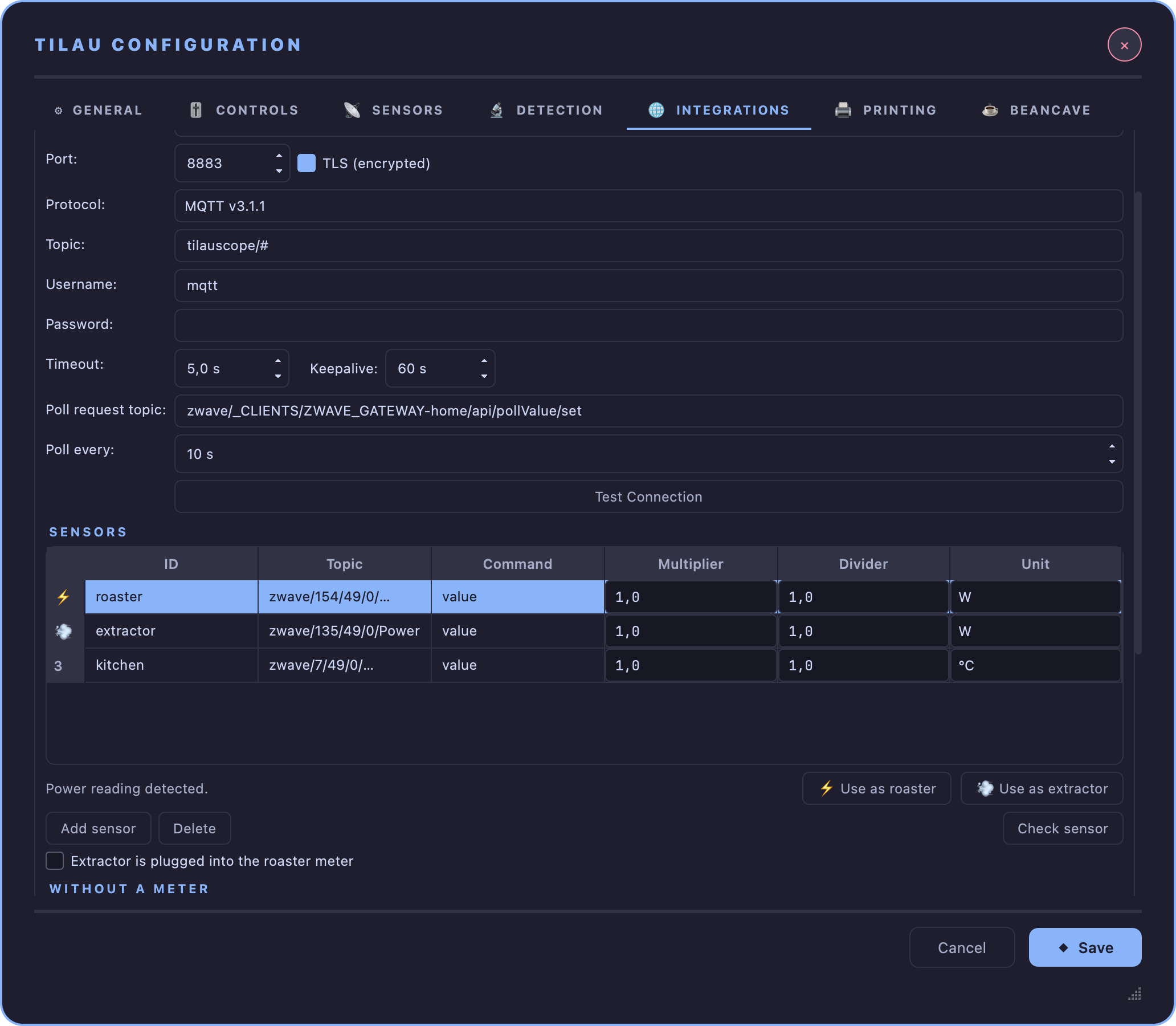
/49/0/Power, for examplezwave/154/49/0/Power. Publishing it as a retained reading lets TilauScope show a value the moment it connects. - Connect TilauScope to the broker: TilauScope → TilauScope Config… → 🌐 INTEGRATIONS → MQTT Broker. Fill in Broker URL, Port, Username and Password, then Test Connection — see Configuration → MQTT Broker.
- Declare the meter as a sensor, in the Sensors list just below: Add sensor, then type
the meter’s topic in Topic. If the meter sends a message holding several values rather than
a bare number, put the name of the power field in Command (often
value). Leave Multiplier and Divider at 1 unless the meter reports in another unit than watts. - Name it: with that line selected, the buttons ⚡ Use as roaster and 💨 Use as extractor appear under the list as soon as the topic ends in Power or the unit is W. Press the one that matches. It writes the name — roaster or extractor — and sets Unit to W in one go. Typing the name and choosing W by hand does exactly the same. If another line already carries that name, the name moves to the selected line and the other line is left with no name, ready to be named again. Once a line is in use, ⚡ or 💨 replaces its line number.
- Check it: Check sensor reads the selected line once from the broker and reports the power it got. A meter that is silent at that moment is still kept.
- Repeat steps 3 to 5 for the extractor, if it has its own meter. If instead it is plugged into the roaster’s meter, see One meter behind the other below.
- Press Save, then turn monitoring off and on again: the sensor list is read each time monitoring starts.
- Confirm: after the next roast, its Energy figure in BeanCave → Roasts reads Measured. The meter is in use.
Nothing else is required: the energy is counted from the sensor itself, whether or not it is also added as an extra device. Adding the MQTT extra device as well draws the power on the roast graph and keeps it in the roast file, like any other channel.
!!! note “When a roast shows no energy, or a source is not used” A source reading Not tracked on a roast that had a meter was not usable as set up. Check, in the Sensors list:
- its line shows ⚡ or 💨 in place of its number — if not, it is not named **roaster** or
  **extractor** (step 4; spaces and capitals in the name do not matter), or its **Unit** is not
  **W**;
- **Check sensor** gets a value — if not, check the topic, the broker connection, and the
  meter itself.
!!! note “One meter behind the other” When the extractor is plugged into the same meter as the roaster, the roaster reading already includes it. Tick Extractor is plugged into the roaster meter, under the Sensors list, and press Save: the extractor is then shown as part of the roaster reading and never added a second time. The setting applies from the next monitoring session, or straight away when saved before START.
!!! tip “Meters that report only on change” Many smart plugs send a reading when the power changes, plus a periodic report — about once a minute. A stable power between two reports is not a fault, and is counted as measured. When a meter stays silent well beyond its usual rhythm, that stretch is left out and flagged rather than filled in. Setting Poll every in the broker settings makes a silent meter show up sooner.
After the roast
Energy is counted from the moment monitoring starts, not from START: the energy of the preheat is kept even though Artisan itself records nothing before START. Nothing is shown while you roast — energy never calls for a gesture on the machine.
Each roast saves its energy record with it, preheat included. Opening the roast again — right after STOP or months later — gives the same figures, recalculated on its milestones: moving CHARGE or DROP afterwards moves the periods with them.
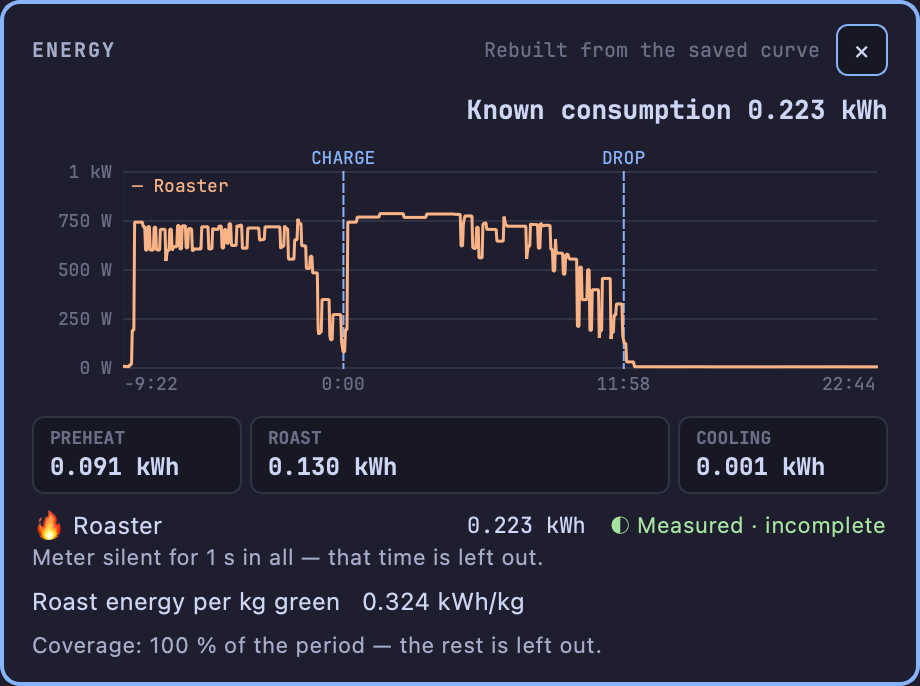
BeanCave → Roasts shows an Energy figure beside the four others: the roast’s kWh, with the kWh per kg and the provenance underneath. Its › opens the energy sheet of that roast, a floating window:
- The total since monitoring started. It is only called Total when every expected source was tracked over the whole period; otherwise it reads Known consumption, and the line at the bottom names what is missing.
- The power curve, in watts, on the roast’s own clock — time counted from CHARGE, negative during the preheat, with CHARGE and DROP marked. A dotted line is an estimate; a grey band marked no reading is time with no source at all. Hovering the curve gives the time and the power at that point.
- Three periods: Preheat (monitoring ON to CHARGE), Roast (CHARGE to DROP) and Cooling (DROP to monitoring OFF), each in kWh. Preheat and Cooling also count any wait at either end of the session; hovering a period gives its exact bounds. Hovering Roast, once dry end and first crack are marked, splits it into drying, Maillard and development.
- One line per source, with its energy and its provenance, and a short note when something is off — a meter that fell silent, or a figure that is only estimated.
- Roast energy per kg green — the roast’s energy divided by the green weight (kWh per kg green). It is shown only once DROP is marked, the green weight is known and every expected source covered the whole roast; otherwise it reads — with the reason.
Roasts saved earlier
A roast recorded before this feature existed has no energy record, but if it carried a power reading named roaster (or extractor) among its extra devices, its energy is rebuilt from that saved curve when it is opened. Such figures are marked rebuilt, and differ from a live record in two ways:
- they start at START — the preheat before it was never saved;
- only the changes in the saved curve count as readings, so a long stable stretch — typically the cooling after drop — can show as incomplete.
A simulated roast is never rebuilt.
Without a meter
Without a meter, the roaster’s power is estimated from the burner setting, between CHARGE and DROP only, and every figure built on it says Estimated. Before charge the machine’s own thermostat decides how much it heats, whatever the setting; after drop the heater is cut while the setting stays where it was. Neither can be read from the burner setting, so neither is estimated.
The estimate rests on the first of these that knows the roaster:
-
TilauScope’s machine database, for these roasters:
Roaster Estimate Skywalker V2 A power curve measured on the operator’s own roasts with a meter on the roaster’s socket — within a few percent of the measured roast energy Skywalker V1 Its 1 000 W rating, not yet checked against a measurement - The Heater power set for the roaster in the configuration, below.
- The heater Artisan rates for the roaster in its energy loads: those set up for this roaster, else those Artisan gives for its capacity — the Aillio Bullet and the Kaleido M1, M6 and M10, for example.
The heater’s power counts in proportion to the burner setting, as Artisan counts it. A roaster that burns gas is not estimated: this chapter counts electricity.
When a meter is present, its reading always wins: the estimate only fills a stretch where the meter fell silent during the roast, and the figure then reads Mixed. When none of them knows the roaster, or outside the roast, no meter means Not tracked — a figure is never invented.
Where the estimate comes from
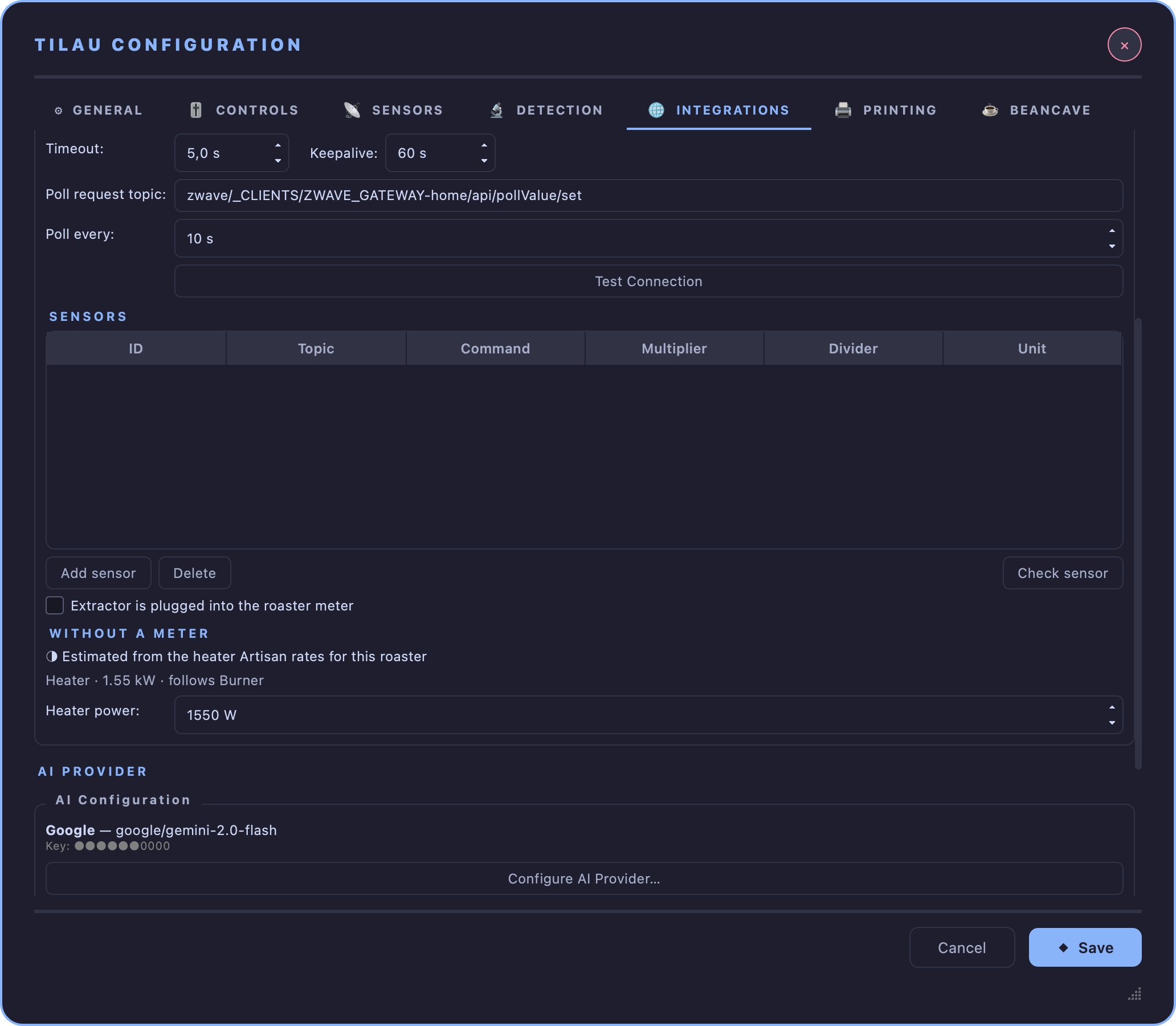
TilauScope → TilauScope Config… → 🌐 INTEGRATIONS, under the Sensors list, Without a meter says where the roaster’s energy will come from:
- ● a meter named roaster is set — it comes first, and the estimate only fills the moments it falls silent;
- ◑ the estimate comes from TilauScope’s power curve, or its rated power, for the roaster;
- ◑ the estimate comes from the heater power below;
- ◑ the estimate comes from the heater Artisan rates for the roaster — listed with its power and the slider it follows;
- ○ there is no estimate for this roaster.
When TilauScope’s database has no figures for the roaster, with or without a meter (the estimate fills the moments a meter falls silent), Heater power sets the power the heater draws at full burner, as on the roaster’s rating plate. It starts on the heater Artisan rates for the roaster, when it rates one. Each roaster keeps its own value; set it to none for no estimate at all. It is not offered on a roaster that burns gas. It is saved with Save, for the roaster the window was opened on, and used from the next monitoring session, or straight away when saved before START.
!!! warning “The extractor is never estimated” An extractor’s speed setting says nothing reliable about the power it draws. Without a meter of its own, it stays Not tracked, and the total reads Known consumption.